
This is part one of a three-part series on IBM Planning Analytics new Forecasting feature.
The new IBM Planning Analytics Forecasting feature allows you to quickly populate future time periods based on past data values. This feature is especially useful to prepopulate a data set for you or your team to then adjust as you see fit. Configuring the forecast settings only takes a few minutes, and the results can be powerful.
- Open the PAW book that contains your forecast view.
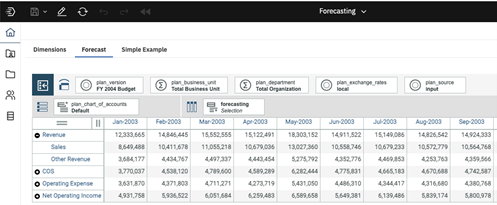
- Click anywhere on the view to activate it. Then click the Forecast icon in the ribbon at the top of the screen. This will open the Forecast window on the right-hand side of your screen.
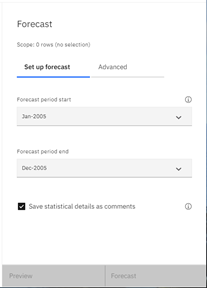
- There are two tabs used to configure the forecast:
- Set up forecast
- Use the drop-down lists to select the forecast period start and end elements.
- Click the checkbox next to “Save statistical details as comments” if you want to disable this feature. By default, information pertaining to the forecast is saved as a comment within the view.
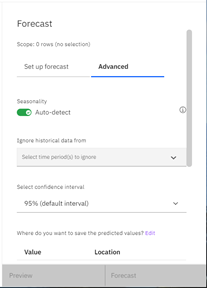
- Advanced
- Click the switch next to “Auto-detect” to disable seasonality. This feature is enabled by default.
- Optionally, use the drop-down list to select one or more time periods for the model to ignore.
- Use the drop-down list to select a confidence interval. This is set to 95% by default.
- iv. Edit the table to configure the version dimension, hierarchy, and elements that should be used to store the model’s predictions.
- Set up forecast
 |
 |
In our next blog post, we will review how to preview your Planning Analytics Forecasting model.
IBM Planning Analytics, which TM1 is the engine for, is full of new features and functionality. Not sure where to start? Our team here at Revelwood can help. Contact us for more information at info@revelwood.com. And stay tuned for more Planning Analytics Tips & Tricks weekly in our Knowledge Center and in upcoming newsletters!
Read more IBM Planning Analytics Tips & Tricks:
IBM Planning Analytics Tips & Tricks: Converting Existing View Directly to Reports
IBM Planning Analytics Tips & Tricks: Maintaining Subset Driven Consolidations
