• Skip to main content
  • Skip to footer
Revelwood Logo

Revelwood

Your SUPER-powered WP Engine Site

  • Who We Are
    • About Us
      • Our Company
      • Our Team
      • Partners
    • Careers
      • Join Our Team
  • What We Do
    • Solutions
      • Workday Adaptive Planning
      • IBM Planning Analytics
      • BlackLine
    • Services
      • Finance Transformation Services
      • Implementation Services
      • Customer Care
        • Help Desk
        • System Administration as a Service
      • Workday Adaptive Planning Integration Center of Excellence
      • Training
        • Workday Adaptive Planning Training
        • IBM Planning Analytics / TM1 Training
    • Products
      • DataMaestro
      • LightSpeed
      • IBM Planning Analytics Utilities
  • How We Help
    • Use Cases
    • Client Success Stories
  • How We Think
    • Knowledge Center
    • Events
    • News
  • Contact Us

FP&A

FP&A Done Right: 3 Strategic Skills for FP&A Leaders

July 9, 2021 by Revelwood Leave a Comment

This is a guest blog post from our partner Workday Adaptive Planning, recommending strategic skills for FP&A leaders.

You stay late to meet your deadlines. You triple-check your reports to keep them error-free. You turn around one-off requests at the drop of a dime.

But you still haven’t gotten that big promotion.

That may mean there’s a disconnect between the work you’re doing and the work your boss would like you to do. Research from Robert Half Management Resources has found that finance leaders want FP&A professionals who can look beyond the bottom line to see the big picture. A study found that 86% of CFOs said strategic thinking abilities are important for accounting and finance professionals, with 30% of those reporting that these skills are now mandatory.

And this demand is only expected to increase. In one popular Workday Adaptive Planning survey, CFOs predicted that the time spent by the FP&A team on strategic tasks will double—to as much as 50%.

To show that you’re ready to take on more strategic responsibilities, start by demonstrating that you can make smart decisions. Developing these three skills will help you highlight your potential—and get picked for the next promotion.

1. Study Every Angle

Strategic thinkers plan by identifying several potential paths forward and weighing their likely outcomes against each other. And according to another survey of ours, 48% of CFOs said that, during a market contraction, finance teams provide the most strategic value by planning for multiple scenarios.

That means FP&A professionals who can identify, model and analyze how different factors could impact the company are more likely to stand out as problem solvers. The right software can help you quickly create projections based on potential risks and opportunities on the horizon—and identify actions that could help your company meet its strategic goals. This type of proactive planning can give you the ammo you need to make well-informed recommendations when it’s time for your boss to make the next big decision.

2. Create Compelling Visuals

When making a presentation to your CFO or board, don’t make your numbers do all the talking. Data is an integral part of the conversation, but it doesn’t tell the whole story. Leaders need you to explain what metrics really mean.

Data visualization can help you cut through the clutter and deliver comprehensive, easy-to-digest analysis. And this is exactly the kind of presentation executive teams crave. According to published reports, 31% of CFOs indicated that improving visualization skills would help FP&A teams represent data more effectively.

Learning how to create visuals that explain variances, period-over-period performance and sales projections will help you deliver the wow factor that will put you in the leadership pipeline.

3. Build Bridges

Sometimes, sitting down with people from other departments is all you need to gain a fresh perspective or uncover a new approach to a common problem. And this type of collaboration is what execs are looking for from their finance team.

According to an off-cited EY report, when CFOs were asked about their top goals for the finance function over the next five years, 95% listed improving business partnering with other units as either critical (58%) or a significant priority (37%)—making it by far the most popular priority.

But collaboration doesn’t have to happen around a table, looking atspreadsheets and a whiteboard. If the company’s data exists in a centralized repository, collaboration can happen virtually. Different teams can drag and drop figures into sharable reports that others can comment on in real time, making it easier to get leaders the fast feedback they need to make more informed decisions.

FP&A needs to put itself in the business leaders’ shoes. Anticipate their needs, and creatively look for ways to add value by providing insights and unique perspectives, improving the efficiency of key activities and introducing frameworks, models and structure to enable these business leaders to better plan, manage and run their operational areas.

Grow next-gen FP&A skills

Modern finance teams are more than number crunchers; they’re key partners in support of a company’s strategic vision. But not every new hire (or, frankly, finance team member) is going to have strong strategic acumen from the start. That’s OK, as long as CFOs and finance leaders are willing to nurture those skills with hands-on coaching.

It’s one thing to hire someone and then give them a list of functions they’re responsible for. It’s another to really check in on them, give them guidance, help them avoid certain potholes, and really help them bridge any gaps. Starting early with leadership training, having team members give presentations to strengthen their communication skills, and emphasizing one-on-one coaching sessions over classroom trainings can all be effective ways to build up skills that stretch beyond classic FP&A duties.

Above we presented the top 3 skills that will help you highlight your potential. In closing, we present the top 8 skills needed in FP&A teams, according to a leading publication for finance professionals:

1. Strategic and critical thinking

Automation technology frees you from the manual work and allows you to have more time to think about data critically and strategically.

2. Communication

To be successful, an FP&A professional needs to ask questions, listen objectively to various viewpoints, consider the information at their disposal, and respond appropriately to various stakeholders across multiple communication channels.

3. Tech Savvy Data analytics

New technologies can benefit your organization in various ways. To recognize them, you need to develop an enthusiasm for new technological advances and intellectual curiosity about what’s coming next. Being a tech savvy finance professional gives you a competitive advantage.

4. Technical accounting and finance skills

Undoubtedly, FP&A professionals must be skilled in their areas of expertise. You need to continue working on your education by learning new aspects of the professional.

5. Innovation

Automation will require finance professionals to be innovative and creative when it comes to solving business problems. This is one of the ways to contribute value to your organization.

6. Anticipating and serving evolving needs

Modern FP&A is not only about mastering skills in data analysis. You will need to recognize emerging requirements around you.

7. Leadership

Finance does not work exclusively with numbers. If you have emotional and cross-cultural intelligence and empathy, it will be easier for you to understand the needs of those around you. There comes a time when finance must be the reassuring voice and visionary.

8. Collaboration

Cross-functional collaboration is playing a major part in the overall success of your organization. FP&A professionals need to learn how to work with colleagues who have other skills. Their expertise and specialties can help finance develop the big-picture ideas. It is also important to keep working on your virtual collaboration and management skills.

This blog post was originally published on the Workday Adaptive Planning blog.

Home » FP&A » Page 3

Filed Under: FP&A Done Right Tagged With: enterprise planning, FP&A, FP&A done right, FP&A leadership, FP&A skills, modern finance

FP&A Done Right: Volatile Business Conditions Require Agile Planning

June 4, 2021 by Revelwood Leave a Comment

FP&A Done Right: Collaborate More When Planning

This is a guest blog post from our partner Workday Adaptive Planning, explaining how to lay the groundwork for business agility.

Manual, spreadsheet-based planning may have worked well enough in a more predictable age. But today? Not so much. Volatile conditions demand a smarter approach to financial planning and analysis (FP&A), and more and more finance professionals are discovering that legacy planning processes don’t let you go there.

It’s not that spreadsheets aren’t great—we love them. But, let’s face it, spreadsheets break down if you’re trying to rely on them systematically to gather data from across the organization, roll up departmental plans, or do complex, collaborative planning.

Even traditional market forces have proven challenging to companies relying on old-world technologies and approaches. Technological advances, ever-increasing customer expectations, and smarter, data-driven decision-making put pressure on finance teams to find new ways to operate with agility.

But how do you plan in a way that allows you to respond to such events, from the predictable to the unlikely?

The answer begins—and ends—with a modern approach to planning.

Why old-world planning is a disadvantage

The traditional planning models finance teams relied on for decades aren’t just a questionable choice in times of disruption—they can leave your business at a grave disadvantage. Businesses hampered by outdated planning processes are often left scrambling to react to changes while more agile competitors outpace, outperform, and outmaneuver them. Look around you: The companies that are performing well at this minute have pivoted—sometimes substantially—in a matter of weeks, sometimes days. Their business agility has become their defining attribute for success.

It’s safe to conclude that many of these agile businesses aren’t weighed down by manual, episodic, and siloed planning. Rather, they’ve likely embraced a more modern approach to planning—planning that’s collaborative, comprehensive, and continuous. These businesses consistently minimize risk, maximize performance, and create competitive advantages because their planning empowers greater business agility.

The difference between static and modern planning can be stark. Legacy planning tools are typically bogged down by versioning headaches and siloed, instantly perishable data. In contrast, modern, strategic planning models allow teams to broaden planning data beyond finance, pulling in real-time operational and transactional data fromERP,HCM, and other slices of the enterprise stack—all to make better, data-driven decisions quickly.

Laying the groundwork for business agility

As many companies recognized even before the current crisis, agility is a business imperative—and this more modern approach to planning is the key to achieving it. These three milestones will get you started on your journey to achieving a new way to plan.

1. Assess the status quo

Before you map out where you’re going, you need to understand where you are. Take inventory of the current state of your company, more specifically the business planning obstacles keeping you from implementing a more modern and streamlined planning environment. More than likely, these obstacles will pertain to people, processes, or technology, or some combination thereof.

Assessing where you are means getting granular.

  • What do your current business planning processes look like?
  • How long does it take you to create a budget? A forecast? An annual plan?
  • Where are opportunities for improvement?
  • Who are your planning stakeholders?
  • What technology do you have in place, and how well is it serving you?
  • What data challenges need attention?
  • What are the bottlenecks?
  • What could be automated that isn’t?
  • Are there any opportunities for automated data integration?
  • What are you lacking in workforce planning?

Answering questions like these will help you get a clear sense of what you’re working with and where you can improve.

2. Get organizational alignment

Being a change agent is no easy task. That’s why you’ll need to recruit a savvy senior-level advocate to help champion planning as a worthy and necessary cause. Along with your senior advisor, you’ll need a task force representative of other departments outside of finance, including operations, sales, and HR. Don’t forget to include IT to help you navigate technology needs and coordinate various data sources.

The next move is to align these key people with the business agility cause you’re championing.

How? Build a business case.

You can do this by quantifying the impact that the organization’s current status quo has on the company. What are manual processes and bottlenecks costing your business in time and money? What opportunities are passing you by? Conversely, what would those measurement strategies and KPI models look like if you implemented a modern, or active planning model? Try to unearth more nuanced ROI measures—for instance, how cutting budget time in half could give your people more time to run critical what-if scenarios—to really drive home the meaningful change that a modern agility planning model would bring.

Once your team is in place and your pain points recognized and quantified, you can map out a plan for your initial project. Consider focusing your initial effort on a function within finance so you’ll have control over the rollout. Develop a multi-phased plan that clearly communicates goals, a concise and actionable plan, and the key metrics for your KPI model. The ability to effectively communicate the why behind this initiative will help secure any executive buy-in you need for the how. A comprehensive and well-thought-out plan will go a long way toward achieving that.

3. Expand across the business

As noted above, there’s a strong case for beginning the rollout of your new planning model in finance and focusing on low-hanging fruit to bring early and easy wins. You’re motoring along, mapping projects, tracking and communicating progress, analyzing KPI reports, and making necessary tweaks. Once a rhythm and familiarity are in place, broaden your scope beyond finance. Initiate planning projects that engage HR, sales, or marketing. This is where you begin to extend the use and impact of modern, company-wide planning.

The key in this phase is to strengthen cross-departmental communication and collaboration. Don’t fall into the trap of relying on your technology or tools to do the heavy lifting. It will be easier to realize and maintain success with regular stakeholder one-on-ones, identifying lessons learned along the way, uncovering opportunities for more ingenuity and improvement, and communicating success and congratulations when they’re warranted.

Doing this will help elevate the role of finance to a strategic force within your organization by orchestrating planning throughout the business. Finance will no longer be known primarily for gathering budget numbers and issuing reports. Instead, your business will look to finance to drive the change and innovation needed to not only weather times of uncertainty, but to thrive in them.

These three pillars lay the groundwork for creating a more agile planning environment—one that will help you plan for what’s coming, whatever that may be. With this foundation and the insights we’ll share in subsequent blogs, you’ll be much better equipped to map your way forward into that tomorrow.

The bottom line

It’s never been easier to define the main driver of business success. It comes down to how fast your business can identify and proactively respond to change. But if your business is mired in static planning —characterized by long planning cycles, immediately obsolete plans, siloed efforts, and hard-to-find errors—it won’t be operating with maximum speed or agility.

This is doubly true in today’s fast-paced, data-driven world. Businesses hampered by outdated planning processes are often left scrambling to react to changes while more agile competitors outpace, outperform, and outmaneuver them.

Wherever you are on your planning maturity journey, the tasks here will help you expand and accelerate business agility by:

  • Creating a new kind of planning mechanism that’s distributed, inclusive, and optimized for your strategic objectives.
  • Empowering finance to continuously deliver insights that help the business course-correct. To power better, faster decision-making in ever-shorter cycles based on rolling forecasts and real-time (and eventually, predictive) data.

The truth is, building a continuous one-to-one alignment between your strategic vision and your operational reality isn’t easy. It’s something very few businesses can claim. You won’t get there overnight and you will face hurdles.

But it only takes a few small steps in the right direction before momentum starts to build. Before long, those steps will amount to a giant leap forward and significant competitive advantage as business agility accelerates exponentially.

This blog post was originally published on the Workday Adaptive Planning blog.

Home » FP&A » Page 3

Filed Under: FP&A Done Right Tagged With: agile planning, business agility, FP&A, FP&A done right, modern FP&A, Rolling Forecasts, Workday Adaptive Planning

FP&A Done Right: 5 Ways Dashboards Empower The Office of Finance

April 23, 2021 by Revelwood Leave a Comment

This is a guest blog post from our partner Workday Adaptive Planning, exploring how to unlock hidden opportunities with dashboards & analytics.

Visualizing data is often the fastest way to identify trends and patterns that lead to insights and better decision making. That’s because the simple clarity of visualizing data via interactive dashboards can reveal hidden opportunities that likely would have been missed in more traditional analysis and sharing of data.

Here are five ways dashboards can help identify valuable insights that may have been overlooked in the past.

1. Dashboards encourage company-wide planning (or xP&A)

Simply making dashboards accessible to stakeholders throughout the organization represents a huge win in itself—and a significant step toward breaking down silos. Yet beyond that, increasing the number of people who have access to data presented in digestible formats exponentially increases the chances of those aha moments occurring. The production floor manager will surely have a different perspective than the CFO. When that perspective is informed with accessible data delivered via a dashboard, the stage is set for new efficiencies and improved productivity.

2. Dashboards show instead of tell

There’s a reason the phrases “go through the numbers” and “eyes glaze over” are often uttered in the same sentence. Traditionally, delivering financial information has largely been a one-way conversation with the finance team presenting mundane reports and data downloads. With the exception of the number crunchers in finance and accounting, many business partners get lost or disinterested when presented with a number or data overload. Dashboards avoid this challenge by elevating the data to the next level and using graphics and visualizations to clearly show data in formats that provide key context and clarity. When data gets presented in highly visual and familiar formats, business users can often quickly see challenges and opportunities that otherwise might have been missed.

3. Dashboards offer customized views for different thinkers

Different people consume information in a wide range of ways. Some may be more comfortable viewing data presented in standard bar, column, gauge, area, and doughnut charts. Yet others benefit from data presented in more engaging or interactive formats. Workday Adaptive Planning dashboards feature data visualization that includes funnels, dials, waterfalls, bubbles, histograms, radars, and Pareto charts. Users across locations and on any device can view data in the formats that connect with their unique way of learning and thinking.

4. Dashboards are ever-present

Even finance pros and business leaders who are adept at extracting insights from traditional reporting face the challenge of locating reports once they are filed away. And once people find the report, they have the time-consuming process of checking if the data is still accurate. Conversely, dashboards are continuously available via a wide range of devices with data updated in real time, assuring users that they are working with the latest available information. So if conditions change or a new opportunity arises, easy-to-access data visualization is there to support decision-making and reveal how an opportunity may be quickly leveraged.

5. Dashboards are inviting and simple to use

The simple power of dashboards is that they are easy to use and invite users to experiment, explore, and discover. By eliminating the complexity barrier, the odds of uncovering hidden opportunities expand dramatically. Ultimately, dashboards create the opportunity for self-service analysis for everyone. That allows any user to perform drilldown analytics, create period-to-period comparisons, and explore iterative what-if analyses that can effectively identify issues that need immediate attention while also identifying trends that could be leveraged through sales and targeted marketing efforts.

This blog post was originally published on the Workday Adaptive Planning blog.

Home » FP&A » Page 3

Filed Under: FP&A Done Right Tagged With: Adaptive Insights, Adaptive Planning, dashboards, FP&A, FP&A done right, Workday Adaptive Planning, xP&A

IBM Planning Analytics Tips & Tricks: MS Word AutoCorrect

March 30, 2021 by Lee Lazarow Leave a Comment

Tips & Tricks

Part of implementing IBM Planning Analytics is ensuring that users understand their model. This often entails documentation that is created as a Microsoft Word document. Most of us know how to use Word but get frustrated typing some of the complex OLAP terms that are required to explain the model. Did you know that Word has a feature which allows you to solve this?

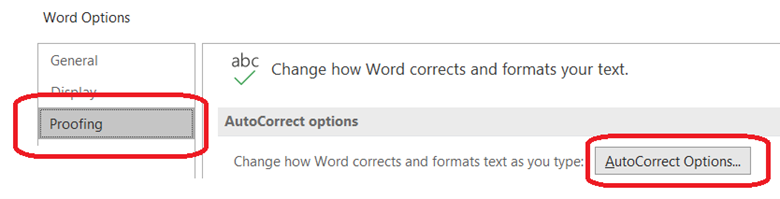
The AutoCorrect feature in Word allows you to define an abbreviation which is replace when you complete a word. This is defined by going into the Word options and selecting Proofing, AutoCorrect Options.

IBM Planning Analytics Tips & Tricks: MS Word Auto Correct

In addition to the list of predefined abbreviations that Microsoft has set up, I use this for the following list of words:

Abbreviation   Full Phrase

consol              consolidation

consols            consolidations

dim                  dimension

dims                dimensions

hier                  hierarchy

hiers                hierarchies

scen                 scenario

I also use this to quickly set up arrows and bullets:

—                      → (an arrow)

*                      •   (a bullet point)

This approach will help you create documents, both notes and formal manuals, faster and easier vs. having to stop and correct the complicated words that arise in our OLAP world.

IBM Planning Analytics, which TM1 is the engine for, is full of new features and functionality. Not sure where to start? Our team here at Revelwood can help. Contact us for more information at info@revelwood.com. And stay tuned for more Planning Analytics Tips & Tricks weekly in our Knowledge Center and in upcoming newsletters!

Learn more IBM Planning Analytics Tips & Tricks:

IBM Planning Analytics Tips & Tricks: Learn the Excel CELL Formula

IBM Planning Analytics Tips & Tricks: Manipulating Text in Excel

IBM Planning Analytics Tips & Tricks: Excel Keyboard Navigation

Home » FP&A » Page 3

Filed Under: IBM Planning Analytics Tips & Tricks, Uncategorized Tagged With: enterprise performance management, Financial Performance Management, FP&A, IBM Cognos TM1, IBM Planning Analytics, MS word autocorrect, Planning Analytics tips, Planning Analytics Tips & Tricks, TM1

FP&A Done Right: Collaborate More When Planning

March 12, 2021 by Revelwood Leave a Comment

FP&A Done Right: Collaborate More When Planning

This is a guest blog post from our partner Workday Adaptive Planning, recommending how to get other departments to collaborate with the Office of Finance.  

When it comes to business, collaboration is vital. After all, no single department can do its job for long without the other departments pulling their own weight. Sales is no good if shipping can’t deliver; marketing falls flat if customer service keeps alienating users; everything grinds to a halt if human resources doesn’t provide the appropriate staffing.

But for some reason, when it comes to the numbers, it can feel like every department is on its own. Data is often stuck in silos, making it difficult or even impossible for other departments to get the information they need to do their jobs well.

Nowhere is this more evident than in the department that makes numbers its business: finance.

But achieving a collaborative finance function can be difficult. That’s because FP&A often lacks the necessary time, direction, or clarity around KPIs to build the cross-functional relationships required to improve forecasting and reporting. So what should be a team effort becomes a finance exercise, and when numbers change, it becomes finance’s fault. In the end, we lose credibility as a business partner.

Make Your Data Everyone’s Data

So how do you get other departments to collaborate with finance? Start by empowering your business partners with more ownership and accountability in the data and your process. For example, many businesses still do most of their forecasting and planning with spreadsheets. Not only is this wildly inefficient (not to mention more likely to include errors), but it keeps all the information bottled up on one person’s screen until they’re ready to share.

We all have seen an Excel spreadsheet named finalV2 or Final V3, only to find out our business partners are using FinalV6. This is a leading cause of number mismatch. Using modern finance tools, a finance team can collect and report on the numbers without needing to send and receive Excel spreadsheets. Everyone is on the same version and making the changes together. This just makes the business partners a part of the overall process, not part of the problem.

The more you can modernize your process and increase visibility into KPIs across the company, the more others will think of “our numbers” instead of “finance’s numbers.” When you create a single source of truth and share it, collaborators will be able to move past arguing about the numbers and start working together to decide on next steps.

A Strategic Bonus to Collaborative Finance

As a bonus, automation and dashboards for self-service collaborative reporting can vastly reduce the amount of transactional work the finance team has to accomplish each day. This frees up our time for both increased collaboration and providing the strategic, high-level analysis that helps move the company forward.

The bottom line: Financial collaboration becomes easier when you stop relying on static spreadsheets. It starts with getting the entire team working with one, trusted set of numbers, and building on a foundation of accurate, up to date data.

This blog post was originally published on the Workday Adaptive Planning blog and appeared here.

Check out more FP&A Done Right posts here:

FP&A Done Right: Five Tips for Budgeting in the Age of COVID

FP&A Done Right: To Recover from Economic Shock, Are CFOs Envisioning Enough Scenarios?

FP&A Done Right: Three Driver-based Budgeting Tips for CFOs when Change is Imminent

Home » FP&A » Page 3

Filed Under: FP&A Done Right Tagged With: Adaptive Insights, Budgeting Planning & Forecasting, enterprise performance management, FP&A, FP&A done right, Planning & Forecasting, Planning & Reporting

FP&A Done Right: Achieve More Reliable Financial Forecasting

February 26, 2021 by Revelwood Leave a Comment

This is a guest blog post from our partner Workday Adaptive Planning, written by Gary Cokins. Cokins is an internationally recognized expert, speaker and author in enterprise and corporate performance management systems. In this piece Cokins outlines three steps for more reliable forecasting.  

When a company fails to meet its financial targets, business leaders want to know why. Was it the pandemic? Did sales underperform? Did operations overspend? Were their purchases more expensive than expected? Was productivity below established standards? Did finance develop a forecast that was wrong from the start?

Determining the causes of budget variances is an effective way to avoid similar missteps in the future, as well as during times of disruption. But many businesses struggle to understand the causes of variances and to define a process that will turn out accurate forecasts every quarter.

Finance and business teams must work together to identify the activities or data gaps that led to a missed forecast projection and caused price, cost, and efficiency variances. Whether poor decisions were made, the business landscape changed, or customer needs evolved, digging into the root cause starts with building relationships based on trust and transparency.

Companies need to continuously answer these three questions: What? So what? and Then what? Answering the first question—What happened?—requires good reporting with visibility. Answering the second question—So what?—involves separating the signal from the noise and determining what is relevant from the reporting. Arguably, answering the third question—Then what?—is the most important and critical part, because only these decisions impact the future.

Here are three tips that will help your finance team set performance targets and standards that company leaders can be confident in.

Step #1: Bring everyone to the table

Hitting a financial forecast isn’t just about meeting sales goals. Employee turnover, travel expenses, marketing costs, and other operational expenditures must be accurately projected to create a viable financial forecast.

But finance teams can’t analyze all these variables on their own. They need to work closely with sales, HR, marketing, operations, and executive teams to get a clear view of past performance, changes on the horizon, and potential risks and opportunities.

Centralizing financial information in a single shared database reduces the time it takes for finance teams to gather this information, giving them more time to focus on analyzing causes of variances and speculating on potential outcomes. Collaborative financial planning software also helps keep information up-to-date by making reporting easier for other departments.

It may take time to get the whole company on board with a new data collection, integration, and delivery process, but the payoff that comes with more reliable reporting is worth the effort.

Step #2: Plan for multiple outcomes

It’s impossible to know for certain what the future might hold. No one has a crystal ball for this. But there are ways to view the planning horizon. One way is to create multiple projections that account for different scenarios. This can include sensitivity analysis by changing some of the variables, such as the forecast sales volume and mix, to calculate projected profits. This can keep your company running on all cylinders—regardless of what comes its way.

Project for at least two possible outcomes—one optimistic and another cautious—so you can create proactive response plans. Look closely at the assumed factors and variables that are most likely to impact your projections. For instance, a change in the price of raw materials, in labor rates, or the emergence of a new competitor could create pricing pressure, which might lead to a decline in revenues.

Scenario planning can also help companies navigate regulatory changes that come with political transition or turmoil. According to a survey by KPMG, 77% of U.S. CEOs say they are focusing more on scenario planning to manage change in the current political environment.

However, with the increasing responsibilities falling on FP&A teams, many feel they don’t have enough time for this type of proactive planning. Sixty percent of CFOs estimate that ad hoc analysis, such as running a new scenario for the forecast, takes up to five days, according to a survey we published a few years back.

Planning and budgeting software can help FP&A teams speed up the time it takes to outline the financial implications of different scenarios and outcomes. The right tool lets teams run reports with the click of a few buttons, giving them more time to consider the risks, opportunities, and assumptions to create comprehensive response plans.

Step #3: Collect customer data

Understanding changing customer preferences, needs, and demands can also help improve the accuracy of financial projections—and boost a company’s overall financial health. However, a third of U.S. CEOs say the depth of their customer insights is limited by a lack of quality customer data, according to KPMG. So it’s no surprise that nearly two-thirds expect to invest in data analytics technology in the next three years.

“The whole idea of knowing what the customer wants before they want it is sort of the brass ring,” Tom Hayes, president and CEO of Tyson Foods, told KPMG. “We have real-time data from the shelf back to our supply chain. It takes out a lot of waste and helps us to more accurately forecast—a great benefit for products with a short shelf life.”

Taking the right steps to figure out where a missed forecast and associated assumptions went wrong will help keep business performance on target year after year.

This blog post was originally published on the Workday Adaptive Planning blog.
Read more FP&A Done Right posts:

FP&A Done Right: There is Life After December – The Fixed Forecast Dilemma

FP&A Done Right: Rolling Forecasts for More Strategic FP&A

FP&A Done Right: The Role of KPIs in Driver-Based Budgets

Home » FP&A » Page 3

Filed Under: FP&A Done Right Tagged With: Adaptive Insights, Budgeting Planning & Forecasting, enterprise performance management, Financial Performance Management, forecasting, FP&A, FP&A done right, Workday Adaptive Planning

Workday Adaptive Planning Tips & Tricks: Excel Reporting Using a Report Template

February 17, 2021 by Revelwood Leave a Comment

Many users of Workday Adaptive Planning utilize OfficeConnect for their Excel reporting. But not all users will have access to OfficeConnect, depending on your organization. But there is another great option for Excel reporting called a Report Template.

What is the difference between OfficeConnect and a Report Template?

Templates are Excel files which can be added to regular reports, including repeating reports. Instead of running an HTML report, you can have a custom Excel report. Below are some nice features, as once you use it, it will become a favorite for reporting.

Report Templates allow:

  • Custom formatting data from Adaptive such as background color, font color, and font type.
  • Calculations on the data, along with including graphs and notes.
  • Use with repeating reports.
  • A saved Excel file attached to a report.
  • Macros can be added to templates.

Here is a quick tutorial on how to create an Excel report using a report template.

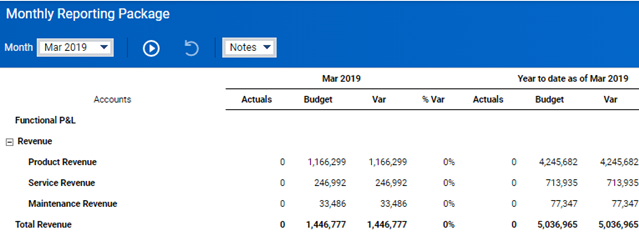
  1. Locate the Adaptive Planning HTML report which has the data you want for your Excel report.

    a. Here is an HTML Report.

    Workday Adaptive Planning: Excel Reporting

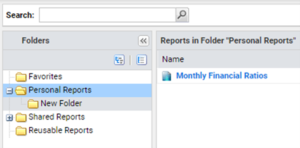
    b. Locate the report in the Reports screen.

    Workday Adaptive Planning: Using a template for Excel reporting
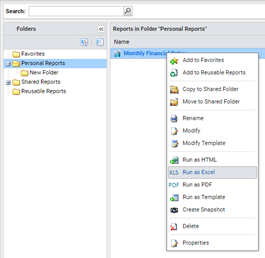
  2. Right click on the report and choose Run as Excel, and the file will download. Learn about Excel reporting using a template in Workday Adaptive Planning
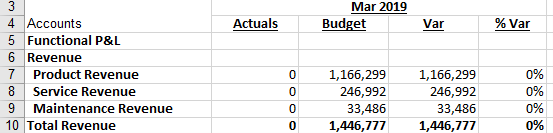
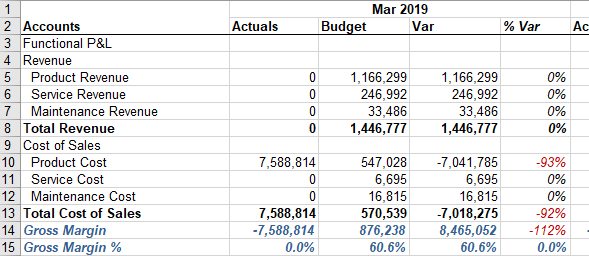
  3. Open the downloaded Excel file. You will see the Excel data on the first sheet.

    a. The report is the same as the report in Step 1 but in Excel.

    How to do Excel reporting with a template in Workday Adaptive Planning
  4. On this sheet, you can change fonts, and add conditional formatting, calculations, etc. If you want to add other sheets for more reporting, you can use formulas to reference data on the first sheet.

    a. In this example, we have changed fonts style and added conditional formatting for the % Var column.

    How to do Excel reporting with a template in Workday Adaptive Planning

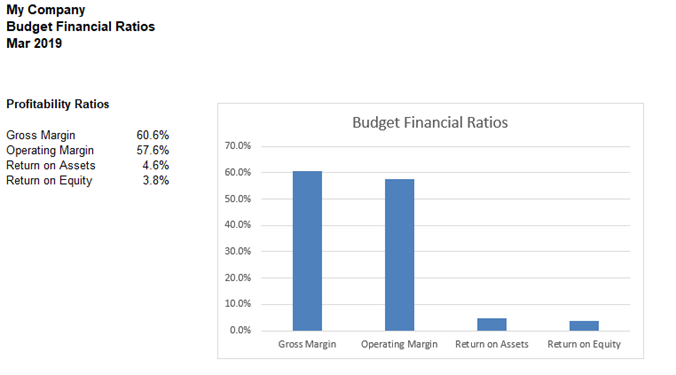
    b. In this example, we added another sheet and created a graph and ratios using formulas to reference the first sheet (report data). You can add multiple sheets to create a customized report or a report book. You can also hide sheets. For example, the Report Info tab Adaptive includes in all excel reports or the first sheet with the data.

    Excel reports using templates in Workday Adaptive Planning
  5. Return to the report in Adaptive Planning.

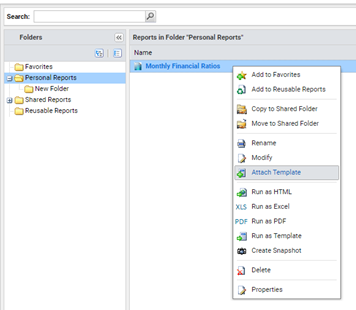
    a. Right click on the same HTML report and select Attach Template.

    Excel reporting using templates in Workday Adaptive Planning

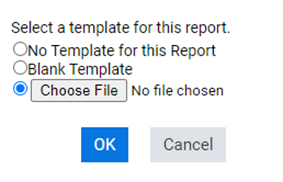
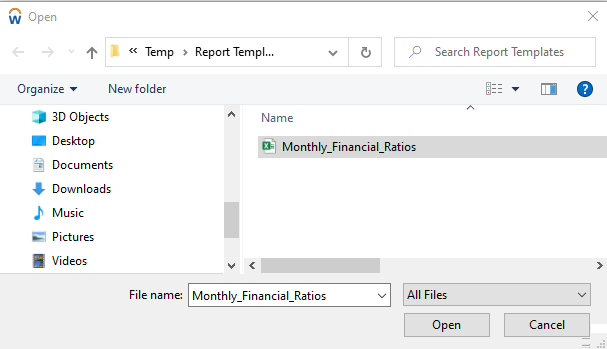
    b. Click Choose File button and select the excel file you just created which has your updated report with formatting, formulas, graphs, etc. Click OK. Once the file is selected click Open.

    Excel reporting using templates in Workday Adaptive PlanningExcel reporting using templates in Workday Adaptive Planning

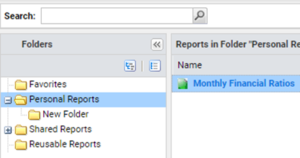
    c. The file icon will change colors from blue to green, so you know the report has been properly attached.

    Excel reporting using templates in Workday Adaptive Planning
  6. Run the report and it will automatically download as an Excel file. Your existing report has been generated and has applied all applicable prompts. For example, the month of data will change per the prompt option selected.

You now have an Excel report! And can run it anytime!

The team at Revelwood has been recognized by Adaptive for its thought leadership in the space, commitment to its Adaptive Insights practice, and its rapid achievements of milestones. Visit Revelwood’s Knowledge Center for our Adaptive Insights Tips & Tricks or sign up here to get our Adaptive Insights Tips & Tricks delivered directly to your inbox. Not sure where to start with Adaptive Insights? Our team here at Revelwood can help! Contact us info@revelwood.com for more information.

Read more Workday Adaptive Planning Tips & Tricks:

Workday Adaptive Planning Tips & Tricks: Expand/Collapse in OfficeConnect

Workday Adaptive Planning Tips & Tricks: Templates

Workday Adaptive Planning Tips & Tricks: Making Your Matrix Report Presentable and Meaningful

Home » FP&A » Page 3

Filed Under: Workday Adaptive Planning Tips & Tricks Tagged With: Adaptive Insights, adaptive insights tips & tricks, adaptive planning report template, enterprise performance management, Financial Performance Management, FP&A, OfficeConnect, Workday Adaptive Planning, Workday Adaptive Planning OfficeConnect, Workday Adaptive Planning Tips & Tricks

FP&A Done Right: Rolling Forecasts for More Strategic FP&A

December 4, 2020 by Revelwood Leave a Comment

This is a guest blog post from our partner Workday Adaptive Planning, written by Bob Hansen. Hansen makes the case for dynamic planning, which is better suited for complexity.

When it comes to FP&A forecasting, most companies base their long-range forecasts on static planning processes, rather than more relevant, dynamic plans that reflect the complexities of the business.

Relying on a forecast that doesn’t enable continuous monitoring of company performance, instead of implementing a modern, rolling forecast approach, is like using an old-school road map to guide you on a cross-country trip: Why use a paper map when you can get to your destination worry-free with a car GPS system?

Rolling forecasts—forecasts that are updated typically on a quarterly or monthly basis—can be a game changer. Especially today, amid a global pandemic. They allow organizations to better align with their strategy, perform more-effective business analysis, and derive greater ongoing value from their budgeting and planning processes. Rolling forecasts make organizations nimbler, able to seize potential opportunities, or better prepared for upcoming roadblocks.

Rolling toward a more strategic focus for FP&A

There is an increasing expectation that strategic guidance—which can be generated through rolling forecasts—emanates from the FP&A team. A CFO Indicator report affirmed that need. The survey found that CFOs expect that time spent by the FP&A team on strategic tasks will double by 2020—growing from 11-25% today to 25-50%.

Furthermore, CFOs are looking for their teams to develop the technical and strategic capabilities that support executing approaches such as rolling forecasts. According to the CFO Indicator survey, if the FP&A team could improve only one skill, 29% of CFOs want that skill to be dashboard design and report building, 25% want it to be predictive analytics capabilities, and 19% want strategic modeling of what-if scenarios.

Fortunately, with the increasingly user-friendly experience of dashboard technology, the skills gap is narrowing, which allows more FP&A teams to start instituting rolling forecasts.

FP&A … so little time

So rolling forecasts are a no-brainer? In theory, yes. Yet the near-universal challenge lies in freeing up finance teams to move toward this new approach. There is a significant gap between what CFOs want their teams to be doing and how they actually spend their days. Often-cited research by APQC shows that only 40% of 130 finance executives from very large organizations rated their FP&A capabilities as effective.

Further, our research shows that 75% of CFOs want their teams to have a significant and strong impact on their organization, yet only 46% expect that their team will have that kind of impact this year. The chief reason continues to be a lack of time for strategic planning.

The clear benefits of rolling forecasts

Despite these time-crunch challenges, the benefits of getting to rolling forecasts are clear. The APQC survey showed that organizations that use rolling forecasts are better aligned with unfolding business strategy, are more effective at business analysis, derive greater value from their budgeting and planning processes, and have more reliable forecasts than those that do not use them. The survey revealed that 94% of businesses that use rolling forecasts described their business analysis as effective. Only 50% of those that do not use rolling forecasts described their analysis that way.

Finance leaders need to clearly promote the many benefits of rolling forecasts and how they can directly impact business results. For example, you can produce a cash flow forecast at the end of a rolling financial forecast process—resulting in a consolidated balance sheet and an accurate view of cash flow for the entire enterprise. Getting C-suite buy-in helps pave the way to get the resources and time needed to develop relevant and robust rolling forecasts.

Moving to rolling forecasts is possible at organizations that have executive support and invest in new, cloud-based finance software. These solutions offer easy-to-navigate dashboards and scores of time-saving hacks that can free finance pros from transactional busywork and allow them to focus on more strategic activities that improve business performance.

Like a state-of-the-art GPS, rolling forecasts can go a long way toward helping you get where you want to go—and position FP&A to be a driver of the business, not stuck in the back seat.

This blog post was originally published on the Workday Adaptive Planning blog and appeared here.

Read more guest blog posts from Workday Adaptive Planning:

FP&A Done Right: Three Driver-based Budgeting Tips for CFOs When Change is Imminent

FP&A Done Right: Modernize your Budget Process to Anticipate Change

FP&A Done Right: Reforecasting in a COVID-19 World – Best Practices you can Implement Now

Home » FP&A » Page 3

Filed Under: FP&A Done Right Tagged With: active planning, Adaptive Insights, dynamic planning, enterprise performance management, Financial Performance Management, FP&A, FP&A done right, Planning & Forecasting, Rolling Forecasts, Workday Adaptive Planning

FP&A Done Right: Three Driver-based Budgeting Tips for CFOs when Change is Imminent

October 2, 2020 by Revelwood Leave a Comment

FP&A Done Right: Collaborate More When Planning

This is a guest blog post from our partner Workday Adaptive Planning, written by Gary Cokins. The blog discusses how uncertainty adds to the arduous and often painful process of budgeting.

Consider these tasks and the problems related to them: budgeting amid great uncertainty about the future (like today during COVID-19); inputting departmental budgets on multiple Excel worksheets; manually reconciling variances and correcting errors; and dealing with broken formulas, misinformation, and inaccuracies. The life of a finance team during budget season is arduous and often frustrating.

It is more frustrating when there is uncertainty about the levels of demand on the organization in the future months.

CFOs tasked with budget presentations often find themselves explaining numbers and assumptions that are far out of date by the time they stand before key stakeholders. Static budgeting simply cannot keep up with today’s lightning-fast economic environment, as so many are now experiencing.

Progressive CFOs using driver-based budgeting, on the other hand, can create a dynamic and agile finance-centered process that helps stakeholders gain insights and make informed decisions tied to strategic and operational goals. This enables CFOs to transition from tactical to strategic leaders. They can align forecasts and projections with external as well as internal drivers (e.g., the impact of unforeseen events; changes to the corporate tax rate or labor contracts). They can expand from “bean counters” to “bean growers.”

This is critical because driver-based budgets not only generate a pro forma income statement and balance sheet for each month into the future but also the cash flow statement derived from them. With this information, the treasury department can plan for investing surplus cash or financing deficit cash. Sadly, bankruptcies occur when organizations run out of money and have exhausted their financing options.

A strategic budget tool for a fast-moving world

Driver-based budgets accomplish more than static budgets, and they do it faster with more validity. In addition to allocating resources based on forecasted demand load to adjust capacity (e.g., number and type of employees, equipment purchases), driver-based budgets enable CFOs to help drive business priorities, respond more quickly to changes in the marketplace and external environment, and create a dynamic, data-driven process, rather than one frozen in countless racked-and-stacked Excel workbooks. Driver-based budgets enable active and continuous budget planning that becomes rolling financial forecasts, rather than annual and fixed planning that culminates in hundreds of unread pages.

Agility is a buzzword for a reason. CFOs hoping to build confidence and credibility in their numbers can no longer rely on static budget tools to get the job done. In a world with increased regulatory volatility, complexity, uncertainty, supply chain mobility, labor market changes, and technological evolution, a CFO must be agile, or generate irrelevant reports and budgets that no one reads or believes in.

Here are there tips to help CFOs get started with driver-based budgeting.

1. Eliminate data silos

Traditionally, CFOs assemble budgets using data from multiple sources throughout the organization. Departments enter their budgets into cost center spreadsheets with little or no idea how their performance ties to larger initiatives. The finance teams are stuck with consolidating the spreadsheets and left guessing how everything fits together. This siloed approach to budgeting keeps stakeholders in the dark about the impacts of revenue and expense projections downstream.

Regardless of company size or industry, CFOs can achieve greater collaboration and eliminate budget silos by identifying a single source of data, generating driver-based rolling forecasts, and creating a centralized and accessible planning resource. Upstream data integration helps operational units view budgets in a larger enterprise-wide context and makes it easier to line up support from key stakeholders.

Ultimately, eliminating silos creates a dynamic budget process that drives rather than reacts to business performance. The budget process is resource-capacity sensitive to projected changes in the sales volume and mix of products and standard service lines. It takes into account which expenses are sunk, fixed, step fixed, or variable. It embraces microeconomic behavior compared to consolidating cost center spreadsheets.

2. Identify KPIs that drive finance and tie to the operational plan

KPIs are measures of operating activities that encompass everything from customers to installations to deliveries to transactions. CFOs might track different KPIs (e.g., bookings versus revenues, sales by geographic location, on-time customer order delivery performance), but more KPIs isn’t always a good thing. All of the measured indicators cannot be a “K”—a key one!

In the case of one healthcare organization, disagreement about KPIs nearly derailed the budget process. Tasked with tracking patient-specific revenue, the budget committee initially identified quality of care metrics as a revenue KPI. The assumption that satisfied patients would return to the facility for care, thereby driving up revenue, ultimately proved less accurate than conducting a demographic analysis. Eventually, the budget committee concluded that indicators like patient age, location, income, race, health status, and utilization histories were more effective KPIs than stand-alone satisfaction metrics. This materially changed the budget and aligned it more closely to organizational goals.

Integrating KPIs into the budget process empowers CFOs to make course corrections, which is particularly relevant now, and to measure overall business performance. It enables CFOs to align the planned expenses with the strategy of the executive team while creating buy-in throughout the organization.

3. Differentiate forecasts from targets

CFOs using driver-based budgeting and rolling financial forecasts must differentiate between forecasts—where the organization is headed—and targets—where the organization hopes to go. Forecasts should be based on a run rate of previous performance with adjustments for increases or decreases of demand on the needed capacity, whereas targets tie to aspirational goals (market expansion, new product and service line launches, etc.).

By separating targets and forecasts, CFOs create a robust budget process that continually course-corrects and adapts to market factors and environmental impacts. They can understand the gap between projected spending and profit levels and the aspirational desires of the executive team. They can then try to identify actions that can narrow the gap.

Investors in a new production facility, for example, would need the finance team to present scenarios based on when the facility would be online, potential construction delays, and other unknown variables. A driver-based budget-oriented CFO would ask important questions like: Do we have a hiring plan in place? What happens if the product components increase from $40 apiece to $50 apiece? She would create best, worst, and likely scenarios against which results would be measured. Targets, on the other hand, relate to where the organization (whether board, leadership, or investors) hopes to go. In the case of a new facility, the revenue target might be 100% production-ready by the next quarter.

Plan and execute

Today’s CFOs are expected to navigate complexity and uncertainty through standardization, automation, and the streamlining of processes, systems, and data. Driver-based budgeting and rolling financial forecasts help report cash flow projections for the treasury department, support growth initiatives, drive profit margin expansion, align with executives’ strategy, and manage business performance through better analytics and reporting.

This blog post was originally published by Workday Adaptive Planning and appeared here.

Read more FP&A Done Right posts:

FP&A Done Right: Planning for What’s Next in Uncertain Times

FP&A Done Right: How CFOs Can Lead in Today’s Challenging Environment

FP&A Done Right:3 Steps to Help You Plan for What’s Coming

Home » FP&A » Page 3

Filed Under: FP&A Done Right Tagged With: Adaptive Insights, Analytics, Financial Performance Management, FP&A, FP&A done right

  • « Go to Previous Page
  • Page 1
  • Page 2
  • Page 3
  • Page 4
  • Page 5
  • Interim pages omitted …
  • Page 7
  • Go to Next Page »

Footer

Revelwood Overview

Revelwood helps finance organizations close, consolidate, plan, monitor and analyze business performance. As experts in solutions for the Office of Finance, we partner with best-in-breed software companies by applying best practices guidance and our pre-configured applications to help businesses achieve their full potential.

EXPERTISE

  • Workday Adaptive Planning
  • IBM Planning Analytics
  • BlackLine

ABOUT

  • Who We Are
  • What We Do
  • How We Help
  • How We Think
  • Privacy

CONNECT

World Headquarters

Florham Park, NJ | 201 984 3030

European Headquarters

London & Edinburgh | +44 (0)131 240 3866

Email
info@revelwood.com

Copyright © 2026 · Revelwood Inc. All rights reserved. Revelwood® and the Revelwood logo are registered marks of Revelwood Inc.